Wednesday, 12 February 2014

How To Hide Friends And Mutual Friends On Facebook


Requested privacy settings (and hidden) on Facebook there is one that allows you to hide your friend list . Not everyone wants you to know with whom your friends with on Facebook but it’s a little difficult to find this setting to change it. It’s been cunningly placed in the privacy settings.
According to what has been written in Facebook’s service center you can hide the friends list but you cannot hide friends in common.
Yet someone seems to have hidden friends in common. How did he do it and what is the mystery behind this hidden setting? Well in this article I will explain everything.

How to hide friends list on Facebook

First of all, we’ll re-explain how to hide friends list on Facebook. All you have to do is visit some friends (from your timeline click on the friends tab, or click here to go directly ) and click on the pencil icon to the right, choose “Edit privacy.”Editing-Facebook-Friends-Privacy
A window will open. From there, change the first field, which regulates the visibility of your friends list. To hide all you need to select “Only me.”
Friends-Privacy
In this window, you can also adjust the privacy of the list of people and lists used and the list of followers.

How to hide friends in common

As I mentioned there is no setting that allows you to hide friends in common, those are always visible. So why not?
Simple. Friends in common should see that their hidden from their friends list!
Let me explain. Suppose that A is friends with B and C both have a mutual friend. If A and B hides the friends list visit the timeline of A, B should see that there is a mutual friend, C. But if C hides his friends list then B, visiting the timeline of A does not see any friends.
Do you understand the “trick”? So how do you hide all the friends in common? Simple, recommended them this article and tell them to hide their friends list! 

How to Create a Facebook Landing Page very Easy 2014

Hello fans today we are including in our blog very useful trick for How to Create a Facebook Landing Page very Easy 2014, If you wanna create a stylish also attractive Landing page for your Facebook fan page, Facebook is the most popular social site in world, Most people using Facebook for meet new friends and for chat, But now its a biggest platform for online marketing, Now time all biggest and small companies are launching there product though Facebook, than you must know about I frame. I frame is a similar like Html, Most apps for Facebook landing page supported by i frames so you must know about i frame, If you don't know more about I frame its OK we are sharing with you complete guide using that you can easily do this. 

How to Create a Facebook Landing Page 2014 image

Why I use Facebook Landing Page for Bossiness 

You know first impression is last impression, Mosley people never come again your page, But you can call gain your visitor giving some good and attractive feeling like welcome page, If your welcome page are really so attractive people also thank that this page also better for them, I means using welcome page you can give a good memory to your fans, Its better for your product and online marketing, So i think you must use attractive fb landing page.

How to Create a Facebook Landing Page 2014 image

How to Create a Facebook Welcome Page using Iframe

There are many apps for create Facebook welcome page or landing page, Some are free and some are premium, All are working with different way but mostly had similar way for work,  We are giving you some popular free application for create Facebook landing page, Just follow below some useful instruction.


  • First You Must Login Facebook.com.
  • Now Just visit for welcome page apps.
  • Now simply Install Application in Your Page.
  • After Install Application Just click on Edit Page Tab.
  • Just Follow there instruction and do it.
  • You Can Use YouTube Video For This


If you have any suggestion please comment below


Final Words
There are many application for create Facebook welcome page, All are have there different method and codes for setup, This is a simple and also easy to use application, You can suggest us more application for welcome page, If you have any question about this article please comment below, We will reply as soon, Thanks for visit keep it.

How To Check Pending Request On Facebook Tricks 2014

Hello fans Today we are including in our site a simple and easy method for How To Check Pending Request On Facebook Tricks 2014, Facebook is including day by day some thing new features for attract to there  users,  Facebook user comes from all around the world. Some are using this social site for increase friends and some are using for there business like promote there product online, There are many apps on Facebook which give you something advance information about this social site,We always trying to share something new.

How To Check Pending Request image photo

How To Know Pending friends Request On Facebook Trick

If you wanna that how many friends request are pending on your personal account you can do it very easily.Using that you can easily trace your pending request for manage your friends request and its also helpful for get more information about your connect new friends too. So I think this trick is also useful for you.

How To Check Pending Request image photo


  • First you must login in your Facebook Account.
  • Now Just visit pending friends request page.
  • Here you will get all information about this.
  • Just manage your friends and done.

Final Words

This is a simple tutorial but most people are don't know about this, Just go on describe link and get all information about your pending friends request, It will helps to manage unknown friends, If you like this article please give us a minute for say thanks by comment below, If you have any question please comment below, You can ask us on Facebook page too. We will reply your answer as well as soon. Thanks for visit keep it.

How To Change Facebook Username name url address after limit reach


How Change Facebook Username name url address after limit reach

Hello fans Today we are launching first time on net tricks for , Every buddy know that Facebook is not provide change user name or your accounts address URL after limit. Every one Facebook is giving to change URL for one time we can change our Facebook URL only one time, After set a URL address we can't or enable edit again. Mostly people and newbie don't know how to use this feature for better profile, Its also a part of your profile, If you have a keyword similar about your name or your product than its benefit for you and also your friends, Using they are connected with you using name URL

How To  Change Facebook User name url address after limit reach 2014 image

What is Facebook User Name or URL Address

If you don't know about Facebook user name or your unique URL address than i wanna say you that every site have a unique username or Facebook Profile URL, Using that everyone can easily connect with or search you using your user name, Like mine Facebook user name is MahendraKumar4 If my any friends know this he ? she can get my Id using facebook.com/MahendraKumar4 simply. So I think you must set your too.

How do I change my name on Facebook after the limit? 2014

Many people ask me that i unfortunately i was set different URL address for my Facebook personal account, When i click on edit button, Than edit button nothing respond, How i did this? After Many Try we get this trick. Actually many people just create a Facebook account after create new account they don't know more about user name and there Facebook profile URL, They simply add any name after some time they think about that but now they can't edit but now you can do it.

How To Change Facebook Profile URL or user name after limit 2014

There are no any one working method without this, We also test this method, For example our first fb URL was facebook.com/mahierror but now we are replace this to facebook.com/MahendraKumar4. Its not possible but we can do this, We are sharing with you a complete tutorial for this just follow us, If you enable to change fb user name using this you can also follow our video tutorial for better understand, Than lets do it.

Lets Change Facebook Account URL or user name after limit 2014


  • First you Must Login In Your Facebook Account.
  • Now Open a Page which have low likes below 200 likes.
  • If you have not a page you can create a page for this.
  • Go on Page and Now Click on Edit Page> Edit  Page Info.

How To  Change Facebook User name url address after limit reach 2014 image

Click on Page Info 


  • Now Click on Edit Facebook Web Address.


  • Now Click on Change web Address.

How To  Change Facebook User name url address after limit reach 2014 image

Now Just replace  Facebook Web Address with Your User Name.

  • For Example My Facebook User Name Is MahendraKumar4
  • Just add your User name on page web address.
  • Now Click on Check Availability and save it.
  • Now Go on your Account setting Tab and click on User name.
  • Now You can Edit you user name, Just add new user name,
  • Now save setting and watch your new Facebook web address.

Final Words

This is awesome Facebook tricks, We are also trying to share something new and also more useful tricks for Fb, If explore our site you will get many tricks which you might don't know, They also gonna very helpful for your, If you have any question About this article please comment below we will sure help you, Thanks for Visit Keep It.

How To Send Message to all Facebook Friends in One Click 2014

Hello fans,Today we are sharing with you best trick for How To Send Message to all Facebook Friends in One Click, Facebook is the unique social site there people always trying to get something new and also advance feature which Facebook officially not provide, But using some scripts or codes you can get many features of this social site which are not share by Facebook, We was share with you many Fb awesome tips and tricks, Mostly awesome or secret tips and tricks completed by some codes or scripts,  Today we are give you something new scrip for send to all friends msg using one click.

Scripts or Codes for Send massage to All Facebook friends in a Click

There are many codes or scripts for this. Fb engineer always trying to get new bugs on this social site and always trying to solve there bugs, There are many scripts and method for this but mostly are not working, Because Facebook engineer always block them, We are giving you latest working method for this , Using this you can easily send msg your all friends using one click.

Send Message to all Facebook Friends using One Click 2014

If you wanna send sms or massage to your all Facebook friends using one click one by one than its so hard and also so time wasting,  If you will try to send one by one its may be get one  minute or half minute, But using our method you can easily send your total friends by one click, Really its amazing, Many people also don't know and many user are always send me massage for this method or code, Finally many use i get this code for you,

How to Massage to all Facebook friends in a click


  • First you open Mozilla Firefox.
  • Now Must login in your Facebook Account.
  • Now Simple Press Control + Shift + K,
  • Now Click on Console and Past This codes using Ctrl + V
  • Now You will see a Popup window like screen shot.
  • Just type your massage there and done.
Warning  -  Please Use This only One Time In a Day. If you use many time Facebook May Be temporary block your sending Massage, So don't miss use this Codes or script, Use it only safe way.

Final Words

This is a very useful codes for send to all friends sms in a one click, But i wanna say you that its not official script or code or method, Fb is not provide this, So use this your self, We are not responsible about this, If you have any question about this article please comment below we will sure reply your answer, Thanks for visit our site please keep it.

How To Delete All Facebook Chat Messages in One Click 2014


How To Delete All Facebook Chat Messages in One Click 2014

Hello guys today we are sharing with you a best and fast tricks for Facebook MSG which is  How To Delete All Facebook Chat Messages in One Click, Facebook's chat system is very attractive every user must using this feature day by day, Actually most people using this social site for chat. If you watch hundreds people timeline than you will see that they don't share any day by day nut if you ask them That how many day after you loging in you fb account than there reply sure that I am using everyday my account. me also update my status or picture and video in more than tow days but i am daily using this massaging service i love this for meet more new friends.

How Can I delete My all Facebook Chat MSG History in one Click ?

Many friends are massage me that how i delete my all facebook chat history in one click, I don't why they wann delete there all msg but mostly need it, Actually mostly wanna when they share there account with there partner and friends, Its must need when they wanna there own massage conversation private, Actually every one don't wanna share there massage to another friends, So many friends are need this method for delete all massage in one click.

How To Delete All Facebook Chat Messages Conversation Using One Click 

There are many method using that you can remove your all fb Chat Messages Conversation in one click very easily, But we are sharing with you latest script or code or tutorial using that you can easily or so fast remove your all Facebook chat conversation in few seconds,  Just install Grease monkey Firefox addon than just restart your Firefox browser and now you need to install script, After install script just follow them its done.

 How To Delete All Facebook Chat Messages in One Click image  

Remove Facebook Chat Messages Conversation Using One Click  


  • First you must Open Mozilla Fire fox Browser.


  • Now simply Install This Addon.


  • Now just restart you Firefox  browser.


  • Now Go on User script.org and install This Script.
  • Now Login in your Facebook Account.
  • Then you will see a Delete Facebook Button.
  • Just use them for delete your all Facebook msg in a click.
Final Words

This is a latest and also updated script, If you will follow all steps you can surely do it, By the way if you get to competing this method please comment below, I wanna also say you that its not facebook official method, If you like this article please give us a minute for say thank, You can support us by share this article with you friends, Thanks for visit keep it.

How To cancel All Sent Facebook Friends Request in One Click


How To cancel All Sent Facebook Friends Request in One Click

Hello fans today we are sharing with you one of best friends tricks which called How To cancel All Facebook Friends Request in One Click ?  Facebook is the grate social site,  This social site every one using for different propose, Some are interesting in friends some are interest in chat and some are using for there business,  Facebook is giving us many feature, Using that we can connect with us our friends, But many peoples are using this feature by sending unwanted friends request, If you no need many more friends in your profile than follow me.

cancel All Send Facebook Friends Request logo image

Easy Fast Way for cancel All Facebook Friends Request in One Click

If you will login in your Facebook account and you have a hugs friends request in you profile for confirm and you wanna remove it than i think you will remove that friends request one by one, Remove one by one friends is very time wasting work, You can remove or delete all friends request using one click also. But now technology is so advance you can delete all Facebook friends request using one click.

How To Delete or Remove All Facebook Friends Request in One Click

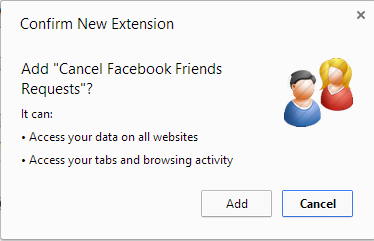
There are many method for this trick, We are sharing with you Google Chrome method, Its completing by a simple but special Google Chrome extension, Just get script and drag on Google Chrome extension and click on it, Just click on it and cancelling all by one click.

Delete or Remove All Facebook Friends Request Using one Click

* First you must Open Google Chrome Browser.

* Now simply Get This Script and Drag into Google Chrome Extension

* Just add this Extension after this you will get There Logo.

* Just Go on Sent Friends Request Tab and Click on Logo.

* Just click on Cancel Its will delete all in few seconds.

* Now Its done.

Final words

We are always trying to share some thing new and also useful Facebook Tips and Tricks, This is also very new, Our mostly tutorials are fully working, If you have any question about this article please comment below, You can support us by share this method with your fans. For more Tutorials keep visit our Blog. Thanks To Khalil for this code.